Look like a studio.
Work like yourself.
Professional approval flows, version-locked sign-offs, and client-facing previews — without hiring a team. From €3/month.
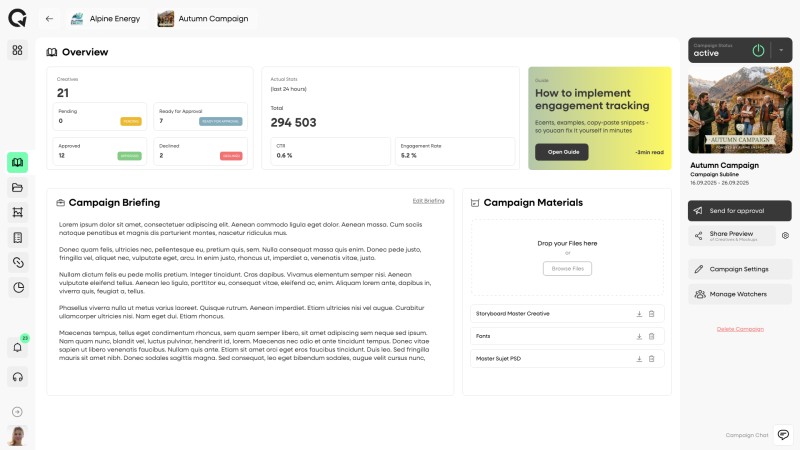




You do agency-level work.
You’re doing it with WeTransfer.
The work is professional. The delivery process isn’t. Every project means the same friction — and clients sense it.
“Is this the final version?”
You sent v3 in an email. Then v4 in a follow-up. Then v4b with the fixed logo in a third thread. Now the client isn’t sure which one they actually approved — and neither are you.
- Secure preview link with version history. Client approves v4b. That’s what goes live. Nothing else.
Dropbox, Drive, WeTransfer — three folders later.
Every client gets a slightly different setup. One prefers Drive, one uses Dropbox, one wants files via email. You spend time managing file logistics instead of building creatives.
- One workspace per client in advox. Same structure every time. You control the environment.
“I never approved that version.”
Something went live that the client doesn’t recognize. They’re sure they signed off on a different version. You have no record. The conversation goes sideways fast.
- Audit trail: version number, timestamp, who approved, when. 30 seconds to resolve any dispute.
You look smaller than you are.
Agencies send clients to structured review portals. You send a Dropbox link and a WhatsApp message. The work is equally good. The process signals otherwise to the client.
- Clients approve directly in a clean interface — no account needed.
Send a link.
Get a sign-off.
Keep the proof.
Generate a secure preview link for any creative — with the real HTML5 file, not a screenshot. Your client clicks Approve or leaves a comment directly on the version. You get a locked, timestamped sign-off you can point to forever.
- No client account needed — just a link they click
- Shows the actual HTML5 creative, not a static image
- Approval is locked to that exact version number — no ambiguity
- Comments thread directly on the creative, on the version
- Full audit trail: who approved, which version, when
- Optional password protection for sensitive work
The practical benefit: when a client says “that’s not what I approved,” you open the audit log. Version 3, approved by [client name], 14 March, 11:24am. The conversation ends there. You don’t lose the revision round.
One workspace
per client.
Zero overlap.
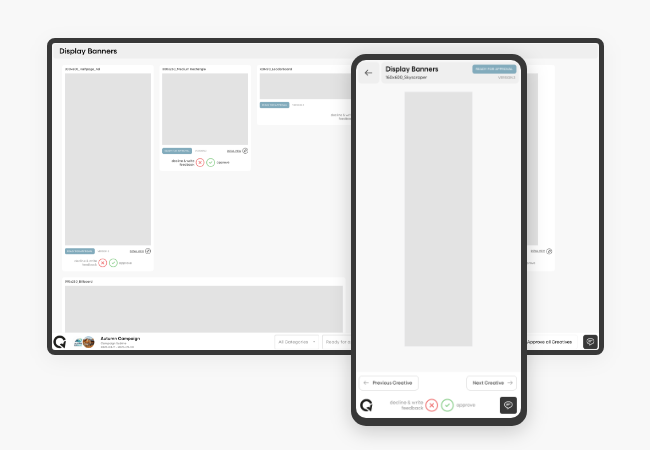
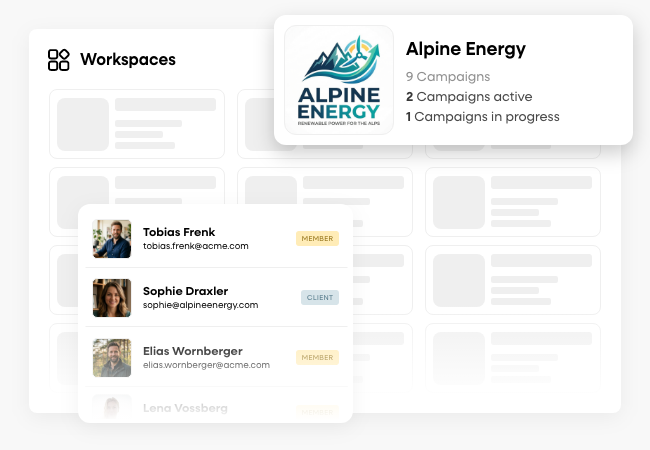
Every client gets their own isolated space in advox — their campaigns, their assets, their history. Nothing bleeds between projects. And every file you upload is automatically versioned. No naming conventions, no manual tracking.
- Separate workspace per client — they only ever see their own work
- Every upload creates a new version automatically
- Full history preserved — nothing gets overwritten
- Version comparison — show clients exactly what changed
- New workspace in under 2 minutes
Learn more about ApprovalsOne client, five projects, two years of history. Everything is still there, in the right workspace, with the right version trail. You can find any deliverable from any project in 30 seconds — even if the client comes back 18 months later.
Before & after
The same project. A very different experience.
WITHOUT ADVOX
- Send v3 via WeTransfer with a long explanatory email
- Client replies on WhatsApp with feedback — "use green, not blue"
- Upload v4 to Dropbox, share link again, hope they find it
- Client responds "looks good!" in an email — not a formal sign-off
- Three months later: "I never approved that version"
- No record, no timestamp, no proof — you eat the revision
- 1–2h per project on logistics, zero protection if it goes wrong
WITH ADVOX
- Upload v3 → generate secure preview link → paste in one message
- Client leaves comment directly on the creative in the preview
- Upload v4 → new version in same link — client clicks Approve
- Sign-off is locked: v4, client name, timestamp
- Three months later: open audit log, 30 seconds to close the conversation
- You have proof. The client doesn't have an argument.
- Delivery in one link · Approval on record · No disputes
Built for how
freelancers actually work.
advox is not a tool you’ll grow into. From day one, Lite gives you what you need to run projects professionally.
Secure preview links
Share a link to the real HTML5 creative. No screenshot, no video recording. Optional password protection for sensitive client work. The client sees exactly what will run.
Complete version history
Every upload creates a new version. Every version is preserved. You can go back to any point in a project’s history — even if a client wants something “like the v2 we had”.
Comments on the creative
Clients leave feedback directly on the version they’re reviewing — not in a separate email thread. You always know exactly which version a comment refers to.
Production Plan
List every deliverable for a project — formats, sizes, placements — in a structured table. Link each row to the actual asset. Always know what’s built, what’s approved, what’s missing.
Campaign statistics
Engagement reports that show clients how their ad actually performed included in every plan.
Ready in 2 minutes
No demo needed. Self-signup via Stripe. Create your first workspace, upload a creative, send the preview link — all before your next client call. Cancel anytime.
Start at €3.
Upgrade when you need to.
Lite covers everything a solo freelancer needs for professional client delivery.
Straight answers.
Do my clients need to create an advox account?
Can i run multiple clients on Lite?
What file types does advox support?
What if a client tries to dispute an approved version?
Can I offer Ad Streaming to clients as a freelancer?
Is there a free trial?
Professional delivery.
From €3/month.
Start your first workspace, send your first preview link, and get your first sign-off on record — today.
- Self-signup in 2 minutes
- No demo needed
- All prices incl. taxes
- Cancel anytime
- EU Hosting · GDPR compliant